


Spam Call Blocker for Android
4.24.15K Reviews
App Specs
- Version
- 3.8.6
- Updated On
- License
- Free
- Downloads
- 1,000,000+
- Developer
- Dingtone Communications Ltd
- Categories
- Communication
- Platform
- Android
Screenshots

 Analysis by AppCompare
In a shared household, an unwanted call rarely affects just the person holding the phone. A phone on the kitchen counter can ring while someone is helping a child with homework, cooking, or trying to hear an expected call from a delivery driver. I find Spam Call Blocker most useful in that ordinary setting: it is a communication app for Android that aims to make incoming calls less disruptive, rather than replace the phone’s usual calling tools.
When one phone serves several people
On a shared device, the first practical question is not simply whether a call looks suspicious; it is whether blocking it could get in the way of someone else. A parent may be waiting for a school, clinic, or tradesperson to call, while another household member is tired of sales calls. That makes the app’s balance between blocking and letting wanted numbers through especially relevant. I would start cautiously, then pay attention to what appears in the call history before relying on stronger filtering.
A useful routine is to check the blocked-call record with the person who normally answers the phone. That creates a simple way to catch a mistaken block without assuming that every unfamiliar number is junk. It is also a better household habit than silently changing settings on a device someone else depends on.
Setting boundaries before turning on stronger filtering
Call filtering always involves a trade-off: a tighter setting can mean fewer interruptions, but a legitimate caller may also be unfamiliar. Before choosing a more aggressive approach, I would consider whether the phone is used for appointments, work callbacks, or one-off service calls. If those are common, keeping an eye on the call log and preserving trusted contacts matters more than trying to block every unknown number.
That is also why I would treat country-based and private-number blocking as deliberate choices, not default answers. They may suit someone who repeatedly receives unwanted calls of those kinds, but they can be a poor fit if a real caller might withhold a number or call from abroad. The practical tip is to change one setting at a time; if a needed call goes missing, it is then easier to identify which choice may have caused the problem.
Coordinating without turning it into a household control system
I would not treat this as a family-management app. It is better thought of as a call-filtering tool on the Android phone where it is installed, with decisions about its settings and call history left to that device’s user. If several people each have their own phone, each person can make a separate choice about how much filtering they want instead of assuming one configuration suits everyone.
For a shared phone, agree on who can adjust the blocking level and who should review reports or missed calls. That small bit of coordination can prevent a well-meant change from hiding a callback another person needs. It also keeps expectations realistic: the app can help sort unwanted calls, but it does not replace checking messages or returning calls from numbers the household recognizes.
Worth Reading Before You Choose

EA SPORTS FC Mobile 26 Is a Bigger Football Game, but It Takes Time

Flipboard Shows What News Apps Must Do Beyond the Feed

Switching to Android Auto Means Rethinking Your Driving Routine

Google Calendar Makes a Crowded Week Easier to Manage

Ludo King Makes the Most of the Minutes Between Plans

Baby Panda World Brings Quick Play to Modern Phones, but Its Game Library Feels Busy
Age, trust, and the person using the phone
The app has an Everyone content rating, which makes its intended audience broad, but that does not remove the need for an adult to think through how a child or less confident phone user handles calls. A younger user may not know that a blocked call could have been legitimate, and an older relative may prefer a familiar routine over adjusting several filters. I would set it up with the person who uses the device, explain how to check the call history, and avoid changing their settings without agreement.
Trust also matters because call filtering works best when users understand what they have enabled. If someone is uncomfortable with an app having access to call-related information, that concern deserves a conversation rather than a quick dismissal. For a person who wants the fewest extra tools and already gets adequate filtering from Android or their phone provider, sticking with those built-in options may be the more comfortable choice.
Ever felt like your phone is just a magnet for spam calls? I know I have. It’s like every time I sit down to enjoy a nice cup of coffee, my phone decides to buzz with yet another unwanted call. Enter the Spam Call Blocker app for Android. I decided to give this app a whirl, and let me tell you, it’s been quite the game-changer.
Getting Started with Ease
Downloading and setting up the Spam Call Blocker was as smooth as butter. The app is available on the Google Play Store, and installation was done in a jiffy. Once installed, the app walks you through a quick setup process that even my grandma could handle. It asks for the necessary permissions to access calls and contacts, which might feel a bit invasive at first, but it’s essential for the app to do its job.
Interface and Usability
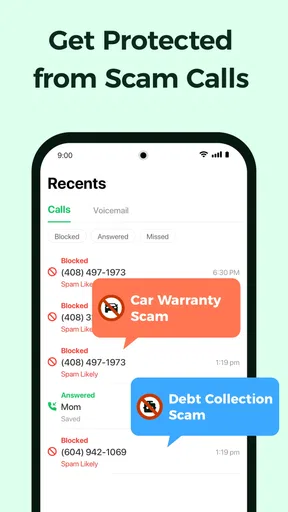
The interface of the app is clean and straightforward. No frills, no fuss, just plain functionality. The home screen displays blocked calls and offers easy access to settings. It’s like the app read my mind and knew exactly what I needed without overwhelming me with too many options. I especially appreciate the dark mode option because, let’s be real, who doesn’t love dark mode?
Features That Make a Difference
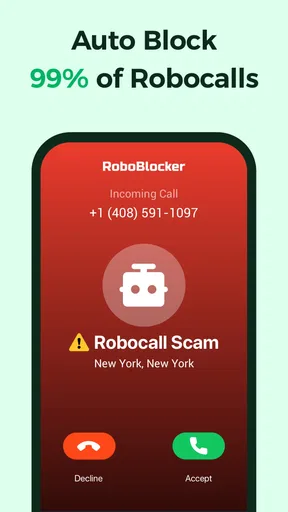
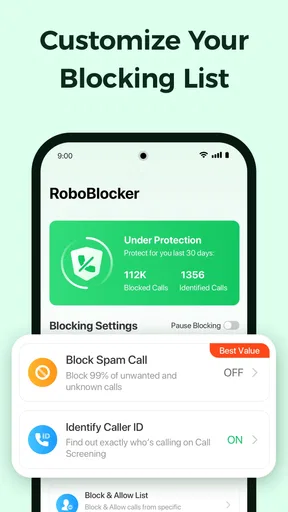
What sets this app apart is its automatic call blocking feature. The app uses a vast database of known spam numbers and updates it regularly to keep you protected. I’ve found it to be highly effective in reducing unwanted calls. Plus, it offers a handy whitelist feature for those numbers you definitely want to hear from.
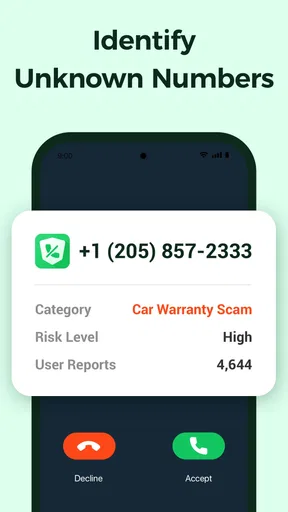
An interesting feature is the call reporting tool. If a spam call sneaks through, you can report it, contributing to the community and making the app even better for everyone. It's a bit like a neighborhood watch, but for your phone.
Performance and Effectiveness
Performance-wise, the app runs seamlessly in the background without draining my battery, which is a huge plus. I’ve noticed a significant decrease in spam calls since using the app. It's like a silent guardian, always working to keep my phone free from disturbances. My phone feels like a whole new device, free from the constant barrage of spam.
Customization Options
One of my favorite aspects of the Spam Call Blocker is the customization it offers. You can adjust the level of blocking, from aggressive to lenient, depending on your comfort level. The app even lets you block numbers from specific countries, which is fantastic if you’re getting a lot of international spam.
The app also offers a feature to block private numbers, which I found particularly useful. No more mysterious calls from unknown numbers that leave you wondering who on earth is trying to reach you.
How it fits alongside Android’s usual options
For many people, the first alternative is the phone app or call screening already available on their Android device or through their carrier. Those built-in tools can be enough if unwanted calls are occasional and the user prefers fewer apps and fewer settings to manage. I would try them first if simplicity and a familiar interface matter most.
This app makes more sense when someone wants a dedicated place to review blocked calls, report a suspected spam number, and adjust how strict filtering should be. The trade-off is that another app becomes part of the phone’s call-handling routine. It is not automatically better than a built-in option; it is more useful when its extra filtering choices solve a problem the existing setup has not.
A realistic day-to-day test
Imagine waiting for a repair person to call while repeated sales calls interrupt the afternoon. I would keep the filtering setting moderate, add numbers I know I need to hear from to the whitelist, and check the blocked-call list after the expected callback window. If the repair person’s number is unfamiliar, this workflow leaves room to catch it instead of assuming every unknown caller is spam. Once the appointment is complete, I could reassess whether stricter blocking is worth the risk of missing another legitimate call.
That approach is more dependable than turning every filter to its strongest setting and forgetting about it. A spam database can help identify known unwanted numbers, but an unfamiliar number is not proof of spam. Reporting a call that slips through may help other users, while reviewing the record helps the owner of the phone spot an error. Both actions are useful precisely because no filter should be treated as infallible.
Cost, version, and who should pass
The app is free to install, with in-app purchases ranging from $1.99 to $59.99 per item. I would begin with the free experience and decide whether it addresses a real annoyance before spending anything. Those purchase options make it sensible to check what a paid item offers in the app before committing; there is no reason to pay simply because a filter is available.
Dingtone Communications Ltd develops it. It was released on July 16, 2021, and version 3.8.4 requires Android 7.0 or later. Its 4.3 average from around 21,000 ratings and more than one million installs suggest it has found an audience, while roughly 3,700 reviews give prospective users additional experiences to consider. I would treat those figures as context, not a promise that the app will identify every unwanted call on a particular phone.
It is a strong candidate for someone who gets frequent nuisance calls and is willing to check a call log now and then. I would skip it if calls from unknown numbers are central to work, if the phone owner does not want to review filtering decisions, or if Android’s existing tools already keep interruptions manageable. In those cases, a less aggressive built-in filter—or no additional blocker—may be the safer fit.
Making the most of reports and settings
One practical way to use the reporting tool is to reserve it for calls that genuinely appear unwanted, rather than reporting every number that is merely unfamiliar. That distinction matters in a household where callers may include a new clinic, a school office, or a one-time service provider. The reporting option is most constructive when the person using the phone can explain why a call seemed suspicious and can correct their own assumptions later.
I would also revisit the whitelist when life changes: a new workplace, a recurring appointment, or a temporary project can bring calls from numbers that were not previously important. This is a small maintenance task, but it prevents an old filtering setup from quietly becoming a source of missed calls. The goal is not to keep a perfect list; it is to make sure the people relying on the phone know how to recognize and recover from a mistaken block.
Household verdict
For a household that wants fewer interruptions without pretending that every unknown caller is dangerous, Spam Call Blocker offers a useful middle ground: automatic filtering, adjustable strictness, a whitelist, and a way to report suspected spam. I like it best when the phone’s main user remains involved, checks blocked calls, and treats country or private-number blocking as a choice with consequences.
It is not a substitute for careful call habits, and it is not the right answer for every shared phone. But if nuisance calls are a repeated problem and the people using the Android device can agree on sensible settings, I would give it a try. Start gently, keep an eye on legitimate callbacks, and only tighten the rules when the call history shows that doing so is worth the trade-off.
Pros
- Effective at blocking spam calls.
- User-friendly interface design.
- Regular updates for new threats.
- Customizable block lists.
- Minimal impact on battery life.
Cons
- Limited features in free version.
- Occasional false positives.
- Ads in free version can be intrusive.
- May require access to contacts.
- Some users report app crashes.
FAQs for Spam Call Blocker for Android
How does Spam Call Blocker work to prevent unwanted calls?
Spam Call Blocker uses a robust database of known spam numbers and advanced algorithms to identify and block unwanted calls automatically. When a call is detected as spam, it either blocks it outright or sends it to voicemail, depending on your settings. Users can also manually add numbers to the block list.
Is Spam Call Blocker free to use?
Spam Call Blocker offers a free version with basic features, such as blocking known spam numbers. However, to access advanced features like real-time caller identification and custom block lists, users may need to subscribe to a premium version, which typically offers a free trial period.
Will Spam Call Blocker affect my phone’s performance?
Spam Call Blocker is designed to run efficiently in the background without significantly impacting your phone’s performance or battery life. It uses minimal resources, ensuring that you stay protected from spam calls without compromising the functionality or speed of your device.
Can I customize which calls are blocked by Spam Call Blocker?
Yes, Spam Call Blocker allows you to customize your experience by creating personalized block lists. You can manually add specific numbers to block, whitelist important contacts, and adjust settings to block unknown or private numbers, giving you full control over which calls are allowed through.
Does Spam Call Blocker require an internet connection to work?
While Spam Call Blocker can function without an internet connection using its existing database, an internet connection is recommended for real-time updates and accessing the latest spam number lists. This ensures you have the most up-to-date protection against new and emerging spam threats.


